Read this first
Docker builds, packages, and runs containers. Kubernetes runs many containers across a cluster of machines and handles scaling, self-healing, and load balancing for you. They are not competitors, they are used together. Most small teams need only Docker (or Docker plus a simple platform). Kubernetes earns its keep at scale, and adopting it too early is one of the more common infrastructure mistakes we see.
01The short answer: they are not competitors
Here is the whole thing in one line. Docker packages your application into a container and runs it. Kubernetes takes containers and runs them across a fleet of machines, keeping the right number alive and healthy without you babysitting them.
Think of it as build versus run at scale. Docker is how you put your app and everything it needs into a single portable unit that behaves the same on a laptop and in production. Kubernetes is what you reach for when one machine is no longer enough and you need something to schedule those units, restart them when they crash, scale them up under load, and route traffic to them.
So the real question is almost never "Docker or Kubernetes." It is "I already use Docker to build my containers, do I also need Kubernetes to run them?" For a lot of teams the honest answer is not yet, and this guide will help you tell.
02What Docker actually is
Docker is a tool for building and running containers. A container bundles your code together with its runtime, libraries, and system dependencies, so it runs the same way everywhere and does not collide with whatever else is on the host. That is the problem Docker solved: the end of "it works on my machine."
In practice you write a short file called a Dockerfile that describes how to assemble your app. Docker uses it to build a container image, a portable, versioned artifact. You run that image as a container locally, and your continuous integration pipeline builds the same image for production. If you want to run several containers together on one machine, for example an API, a database, and a cache during local development, Docker Compose lets you define and start them with a single command.
The key point for this comparison: Docker mostly operates on a single host. It is a developer and packaging tool. It does not, on its own, spread your containers across many servers or automatically replace one that dies at 3am. That is where orchestration comes in.
One practical note worth knowing: Docker Desktop, the desktop application, requires a paid subscription for larger companies, specifically organizations with more than 250 employees or more than 10 million dollars in annual revenue. Docker the engine and the image format are open and free; it is the Desktop app at company scale that carries a license fee. Small teams are unaffected, but it is worth checking before you standardize on it. Docker's own documentation is the source to confirm current terms.
03What Kubernetes actually is
Kubernetes is a container orchestrator. You give it your container images and a description of how you want them to run, and it takes over the operational work: deciding which machine each container runs on, restarting containers that fail, scaling the number of copies up and down, rolling out new versions without downtime, and load balancing traffic across them.
A Kubernetes setup is called a cluster. A cluster has a control plane, which is the brain making all those scheduling and scaling decisions, and a set of worker nodes, which are the machines that actually run your containers. Your app runs inside pods, the smallest unit Kubernetes schedules. You tell Kubernetes the desired state ("keep five copies of this service running"), and it works continuously to make reality match that description. Kubernetes was created at Google and open sourced in 2014, and it has become the standard for running containers at scale.
Two clarifications that cut through a lot of confusion. First, Kubernetes does not require Docker. It uses a container runtime such as containerd or CRI-O, and it removed its old Docker-specific shim back in 2022. This changed nothing for most people, because the images Docker builds follow an open standard (OCI) and run on Kubernetes exactly as before. Second, despite the occasional headline, there is no "Kubernetes 2.0." It ships steady releases on its 1.x line; treat any "2.0" claim as clickbait.
04Docker vs Kubernetes, side by side
The cleanest way to hold the difference in your head is containerization (Docker) versus orchestration (Kubernetes). Here is the direct comparison.
| Dimension | Docker | Kubernetes |
|---|---|---|
| What it does | Builds and runs containers | Orchestrates containers at scale |
| Scope | A single host | A cluster of many nodes |
| Handles | Packaging, local run, single-host workflows | Scaling, self-healing, load balancing, rolling updates |
| Do you need it | Almost always, to build images | When you outgrow a single host |
| Startup verdict | Yes, start here | Usually later, if at all |
Read that last row carefully. It is not that Kubernetes is worse; it is that the two tools answer different questions, and you reach for them at different stages.
05They work together: the real workflow
Once you see how a container gets from your laptop to production, the "versus" dissolves. Here is the standard flow that uses both tools:
Write a Dockerfile.
Your CI/CD pipeline uses Docker to build a container image from it and runs your tests against that image.
Push to a registry.
The pipeline pushes the finished image to a registry, a store for images such as Docker Hub, Amazon ECR, or Azure ACR.
Kubernetes deploys.
Kubernetes then pulls the image from that registry and deploys it across the cluster, creating however many copies you asked for, spreading them across nodes, and keeping them healthy.
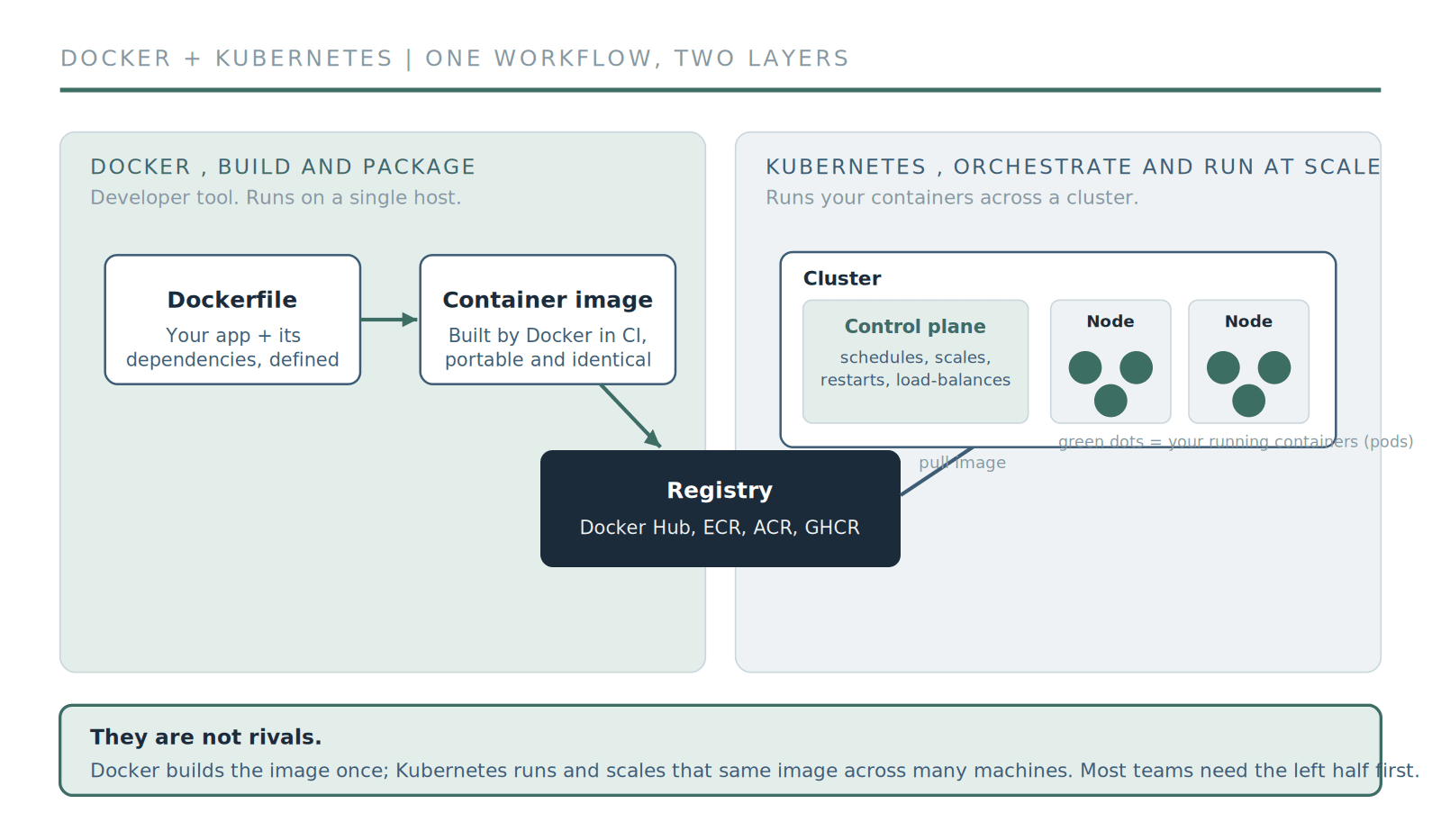
Docker builds and packages the image once; Kubernetes pulls that same image and runs it at scale. Two layers of one workflow, not two competing products.
Notice that Docker's job finishes at the registry. Everything after that, the running, scaling, and healing across machines, is Kubernetes. If your app never needs more than one machine, you simply never add the Kubernetes half.
06The comparison you probably mean: Compose or Swarm vs Kubernetes
When people ask "Docker vs Kubernetes," the honest translation is usually one of two real comparisons.
Docker Compose vs Kubernetes
If you are running a small app, the practical comparison is Docker Compose vs Kubernetes. Compose runs a handful of containers on one machine from a single config file. It is perfect for local development and for small production apps that comfortably fit on one server. Kubernetes does far more, across many machines, at the cost of far more complexity. For the majority of applications that will never need to scale beyond a single host, Compose (or a managed platform, more on that below) is the right tool, and Kubernetes is overkill.
Docker Swarm vs Kubernetes
If you specifically want orchestration, the real comparison is Docker Swarm vs Kubernetes. Swarm is Docker's own built-in orchestrator. It is simpler than Kubernetes, but it has largely gone dormant, and the ecosystem, tooling, and hiring market have consolidated around Kubernetes. If you have genuinely outgrown a single host, most teams should look at Kubernetes (ideally managed, see section 9) rather than Swarm.
So the useful mental model is a ladder: Docker on its own, then Docker Compose on a single server, then a managed platform, and only then Kubernetes. You climb it when your workload forces you to, not before.
Not sure which rung you are on?
We help startups pick the simplest container setup that will actually hold, and move up the ladder only when the scale is real.
Kubernetes consulting07Do you actually need Kubernetes?
This is the section the high-ranking listicles skip, and it is the one that saves you the most money. Kubernetes is powerful and genuinely worth it at scale, but it carries a real operational tax: it is complex to run, easy to misconfigure, and it demands ongoing attention. Adopting it before you need it is one of the worst infrastructure decisions a growing team can make, because you pay all of that cost for capabilities you are not using.
You are running dozens of containers, not a handful, and coordinating them by hand has become a job in itself.
You need automatic scaling and self-healing, where load spikes and failed instances must be handled without a human awake.
Multiple teams need isolation on shared infrastructure, with separate namespaces, access controls, and resource limits.
You are deploying across multiple regions or clouds and need consistent orchestration everywhere.
You have stateful workloads at scale that need persistent storage coordinated across a cluster.
And here is the honest inverse: If you are pre-launch or early, running a straightforward app, deploying a few times a week, on one to a few servers, with a small team and no real auto-scaling need, you do not need Kubernetes yet. You will move faster without it. When several of the triggers above become your daily reality, that is the signal.
08If you don't need it yet: Docker Compose or a PaaS
Saying "don't adopt Kubernetes yet" is only useful if we tell you what to do instead. You have two good options.
Docker Compose on a single server
If your app fits on one reasonably sized machine, Compose plus a simple deploy process will serve you well for a long time, and it is dramatically simpler to operate than a cluster.
Managed platform (PaaS) or serverless containers
Services such as Google Cloud Run, AWS Fargate, Railway, Render, and Fly.io take your container image and run it for you, handling scaling and much of the operational work, with none of the cluster management. For most pre-seed and seed-stage teams this is the sweet spot: you keep building with Docker, you get real scalability, and you skip the Kubernetes learning curve entirely. You can always migrate to Kubernetes later, once you have proven you need what it offers.
09When you do: use managed Kubernetes
When you genuinely reach Kubernetes scale, one more honest recommendation: do not self-host the control plane early. Running your own Kubernetes control plane means owning cluster upgrades, availability, security patching, and a long list of moving parts. As a rough rule of thumb, that is on the order of half to one full-time engineer's worth of ongoing operational work, which is a heavy price for an early team.
Instead, use managed Kubernetes: Amazon EKS, Google GKE, or Azure AKS. The provider runs the control plane for you, so you focus on your workloads rather than on keeping Kubernetes itself alive. To be clear, managed Kubernetes reduces the operational burden, it does not remove it; you still own cluster health, upgrades, and workload tuning. A middle path some teams like is a Kubernetes-powered platform that gives you a simpler, Heroku-style developer experience on top of a cluster.
10Where this is heading in 2026
The pragmatic consensus in 2026 is "platform first, Kubernetes only when you have proven you need it." Modern managed platforms and serverless container services now handle a scale of traffic that used to require a Kubernetes cluster, which means fewer teams have to touch Kubernetes directly, and those that do tend to reach for it later than they once would have.
That does not mean Kubernetes is fading. It remains the backbone of large-scale container systems and the standard the whole ecosystem is built around. What has changed is that it is no longer the automatic default for every new project. The smart move is to start with the simplest thing that works, keep your app containerized with Docker so you stay portable, and adopt Kubernetes deliberately when your scale demands it. If you want to understand the bigger picture first, our explainers on what Docker is, what Kubernetes is, what DevOps is, and what CI/CD is are good companions to this piece.
Not sure whether you need Kubernetes yet?
That decision is easier to get right with a second opinion. Our team helps startups pick the simplest setup that will actually hold, and move to Kubernetes only when the scale is real.
Contents
Frequently Asked Questions
Common questions about Docker and Kubernetes
Quick answers to the most common questions.
01Is Kubernetes replacing Docker?
02Do I need both Docker and Kubernetes?
03Does Kubernetes use Docker?
04What is the difference between Docker Compose and Kubernetes?
05When should a startup adopt Kubernetes?
Not sure whether you need Kubernetes yet?
That decision is easier to get right with a second opinion. Our team helps startups pick the simplest setup that will actually hold, and move to Kubernetes only when the scale is real.
No pressure. Just a conversation to see if we're a good fit.