Direct answer, read this first
CI/CD automates how code moves from a developer's commit to production. Continuous integration (CI) automatically merges, builds, and tests every change. Continuous delivery (CD) keeps that tested code ready to release with one click, while continuous deployment goes further and releases every passing change automatically. Together they let teams ship faster with fewer bugs and less downtime. You can run CI on its own, but you cannot do CD without CI first.
01What problem does CI/CD solve?
Picture a small team without it. A developer finishes a feature and it sits for two weeks, because releasing means someone manually pulling the latest code, running the build steps in the right order, testing by hand, and pushing to the server after hours so customers don't see the fallout if it goes wrong.
Changes pile up between releases, so when something does break, there are two weeks of changes to search through to find the cause. Engineers call this "integration hell": the longer code sits unmerged and untested, the more painful it is to combine. CI/CD does the opposite of waiting. It integrates, tests, and releases small changes constantly, so nothing has a chance to pile up.
02What does CI/CD actually mean?
The two letters cover related but distinct ideas, and this is where most explanations get muddy. Kept simple:
CI, continuous integration, is about the code coming together.
Every time a developer pushes a change, it is automatically merged into a shared repository, built, and tested. You find out within minutes whether the change is safe.
CD, continuous delivery or deployment, is about the code going out.
Once a change passes CI, it is automatically prepared and moved toward production, either up to a final human approval (delivery) or all the way to live users (deployment).
You can do CI on its own. You cannot really do CD without CI first, because releasing on demand only works when every change is already built and tested automatically.
03CI vs continuous delivery vs continuous deployment
This is the distinction worth getting right, because the two "CD"s are not the same thing. Mixing them up leads to teams thinking they have automated more, or less, than they actually have.
| Continuous Integration (CI) | Continuous Delivery (CD) | Continuous Deployment (CD) | |
|---|---|---|---|
| What it automates | Merging, building, and testing every change | Getting a validated change release-ready and into staging or production | Releasing every passing change straight to production |
| Who releases to production | Not this stage | A human approves the final push | Fully automatic, no manual gate |
| Depends on | The foundation for everything after | Requires CI first | Requires CI and continuous delivery first |
| Best when | Always. This is table stakes | You want control over the exact moment you release | You have strong tests and want maximum speed |
In plain terms: continuous delivery keeps you always ready to release with one click, but a person still chooses when. Continuous deployment removes even that click, so every change that passes the tests goes live on its own. Deployment is faster; delivery gives you a moment of human control. Many teams run continuous delivery for a while before they trust their tests enough for full continuous deployment.
04How does a CI/CD pipeline work?
The whole thing runs as a pipeline: an automated sequence that carries a change from a developer's commit to production. Most pipelines follow the same stages.
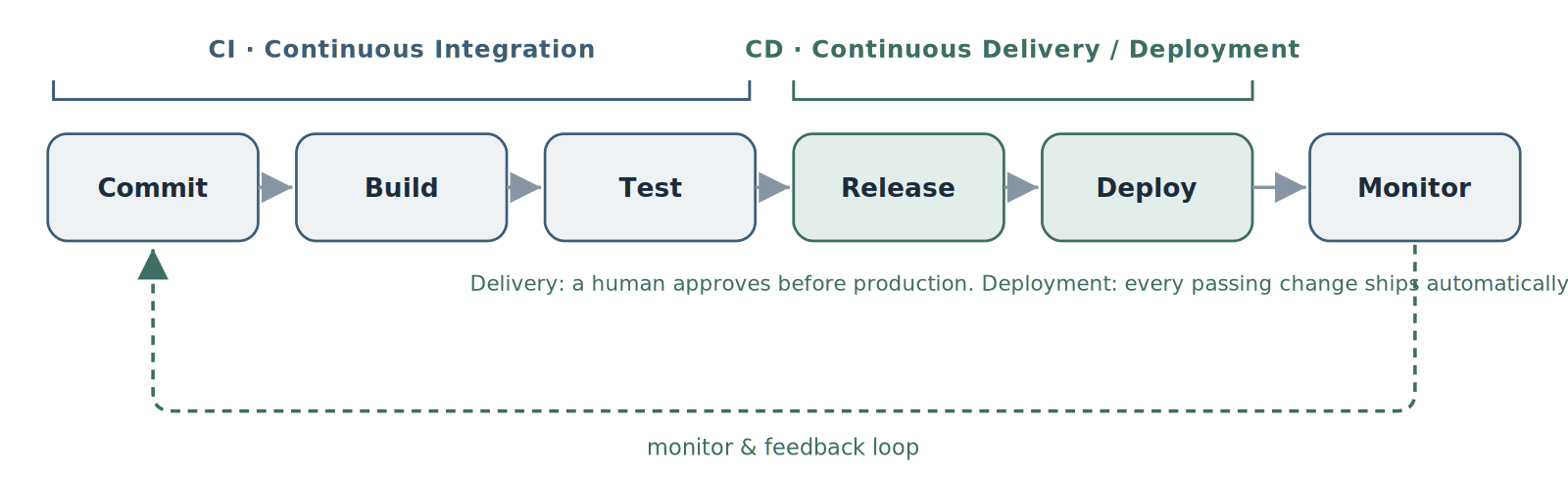
A CI/CD pipeline: CI covers commit, build, and test; CD covers release and deploy, with monitoring feeding back.
| Stage | What happens | Common tools |
|---|---|---|
Commit | A developer pushes a change to shared version control, which triggers the pipeline | Git, GitHub, GitLab |
Build | The code is compiled and packaged into an artifact, built once so the same artifact deploys everywhere | Docker, Maven, Gradle |
Test | Automated unit, integration, and end-to-end tests run against the change | PyTest, Jest, Selenium |
Release | The validated, versioned artifact is prepared for production | GitHub Actions, GitLab CI, Jenkins |
Deploy | The change goes to staging, then to production | Argo CD, Helm, Spinnaker |
Monitor | Production is watched, and what is learned feeds the next change | Prometheus, Grafana, Datadog |
A useful principle here is "build once, deploy anywhere": the same tested artifact moves through staging and production, so you are never rebuilding and hoping the result matches.
05What are the benefits of CI/CD?
Done well, CI/CD changes how a team ships:
You release faster.
Small automated releases mean features reach users in days, not weeks.
You catch bugs early.
Tests run on every change, so problems surface while they are small and easy to trace, not two weeks later buried under other changes.
Releases stop being scary.
With automated tests and a repeatable path to production, deploying stops being an after-hours event.
Recovery is faster.
When something does slip through, small changes are easy to roll back.
The team sees everything.
Everyone can see the status of every build, test, and deployment, which cuts the "works on my machine" friction.
This is also measurable. Two of the industry-standard DORA metrics, deployment frequency and lead time for changes, are essentially a scorecard for how well your CI/CD is working.
06What tools do you need for CI/CD?
You do not need every tool to understand CI/CD, and you certainly do not need all of them. The common building blocks are a version control host (GitHub, GitLab), a pipeline engine (GitHub Actions, GitLab CI, Jenkins, CircleCI), and, for GitOps-style delivery, a tool like Argo CD. The right stack depends on where your code already lives and where it runs. Setting the pipeline up properly is what our CI/CD pipeline setup work focuses on.
07What does CI/CD look like in 2026?
A few shifts are worth knowing about, because they change what a modern pipeline looks like:
Security moved into the pipeline.
Scanning code, dependencies, containers, and secrets is now a standard step rather than a separate audit at the end. The practice is called DevSecOps, and the idea is to catch issues while they are cheap to fix.
GitOps.
More teams manage deployments through Git itself, so the state of production is defined in a repository and a tool reconciles reality to match it.
Infrastructure in the pipeline.
Infrastructure-as-code changes now flow through the same CI/CD process as application code, tested and reviewed the same way.
AI assistance.
Pipelines are starting to use AI to flag risky changes, pick which tests to run, and speed up diagnosis when a build fails. It is useful for cutting noise, though a human still owns the call on what ships.
08Do you need CI/CD, and how do you start?
Almost any team shipping software regularly benefits from at least basic CI/CD. The mistake startups make is the opposite of skipping it: they try to build an elaborate, multi-stage pipeline on day one and get bogged down.
Start simple. A minimal but real pipeline that builds, runs your tests, and deploys on every push to your main branch is worth more than a sophisticated one you never finish. You add stages, security scans, staging environments, and automated rollbacks as the product and team grow. The goal on day one is just to stop releasing by hand.
Get it set up right
Want CI/CD set up correctly from the start without pulling your engineers off product? That is exactly what our CI/CD pipeline setup and managed DevOps work are for.
Book a free technical callWe will tell you what is worth doing now and what can wait.
Contents
Frequently Asked Questions
Common questions about CI/CD
Quick answers to the most common CI/CD questions.
01What does CI/CD stand for?
02What is the difference between CI and CD?
03What is the difference between continuous delivery and continuous deployment?
04Is CI/CD part of DevOps?
05What is a CI/CD pipeline?
06Do small teams need CI/CD?
07What tools do you need for CI/CD?
Need help implementing CI/CD?
Book a free technical call and we will tell you honestly what is worth doing now and what can wait.
No pressure. Just a conversation to see if we're a good fit.