Direct answer, read this first
Kubernetes automates running containers at scale. You describe the state you want, how many copies of your app, how they should behave, and Kubernetes keeps it running, restarting and scaling containers across a cluster of machines automatically. It is powerful but genuinely complex, and most early-stage startups do not need it yet: a platform-as-a-service or serverless containers is usually the better first choice.
01What problem does Kubernetes solve?
Your app runs in a handful of containers. On one server, that is easy. Then traffic grows and you need ten servers. Some containers crash at 3am and need restarting. You want to roll out an update without downtime, and roll it back fast if it breaks. You need to spread containers across machines so one failure does not take everything down.
Doing all of that by hand, restarting crashed containers, balancing them across servers, replacing dead machines, is a full-time babysitting job. Kubernetes automates it. You describe what you want ("keep five copies of this app running, spread across the cluster"), and Kubernetes makes it happen and keeps it that way, replacing anything that fails without waking anyone up.
02What does Kubernetes actually mean?
Kubernetes is a container orchestrator. Orchestration is the automated coordination of many containers: deciding which machine each one runs on, restarting the ones that fail, scaling them up and down with demand, and connecting them to each other and the outside world.
It started as an internal Google project called Borg, was open-sourced in 2014, and is now the flagship project of the Cloud Native Computing Foundation (CNCF) and the de facto standard for running containers at scale. The name is Greek for "helmsman," and "K8s" is just shorthand (a K, then eight letters, then an s).
03What are the building blocks? (containers, pods, nodes, clusters)
Kubernetes has its own vocabulary, but it is really just four nested ideas.
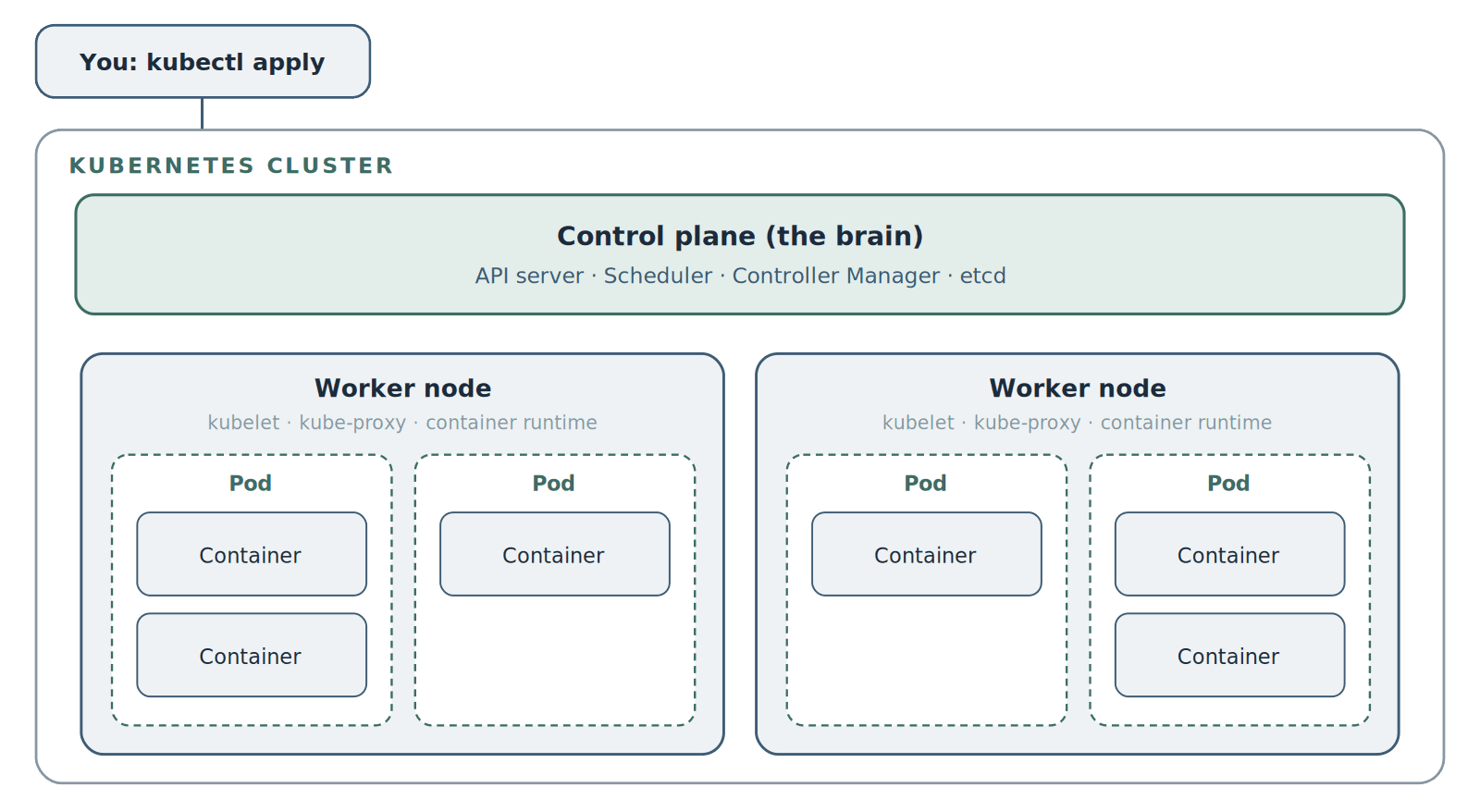
A Kubernetes cluster: a control plane managing worker nodes, which run pods, which contain your containers.
Container
A packaged application with its code and dependencies, the thing that actually runs
Pod
The smallest unit Kubernetes manages; it wraps one or more closely related containers
Node
A machine, virtual or physical, that runs pods
Cluster
All the nodes together, plus the control plane, managed as one system
Control plane
The 'brain' that decides what runs where and keeps reality matching the state you asked for
The nesting goes: containers live inside pods, pods run on nodes, and nodes are grouped into a cluster that a control planemanages. When people say they are "running Kubernetes," they mean they are operating a cluster.
04How does Kubernetes work?
The idea that makes Kubernetes tick is desired state.You do not give it step-by-step commands. You hand it a description of what you want, usually a YAML file, that says something like "run three copies of this app, expose it on this port." You apply that with a command (kubectl apply), and the control plane takes over.
The control plane is the brain. Its API server receives your request, the scheduler decides which nodes have room, and controllers constantly compare the real state of the cluster against your desired state. If you asked for three copies and one crashes, a controller notices the gap and starts a replacement. That constant reconciliation is why Kubernetes is called self-healing: it is always working to make reality match what you declared. Each worker node runs an agent (the kubelet) that starts and stops containers, plus networking (kube-proxy) and a container runtime that actually runs them.
05Docker vs Kubernetes: what is the difference?
This is the most common point of confusion, so it is worth being clear: Docker and Kubernetes are not rivals, they solve different parts of the same problem.
Docker
The tool most teams use to package an application into a container and run it. Docker is how you make the box.
Kubernetes
What runs and coordinates many of those containers across many machines. Kubernetes is how you manage a warehouse full of boxes.
In practice they work together: you build your app into a container image (often with Docker), and Kubernetes takes that image and runs it at scale. A single container on your laptop does not need Kubernetes. A fleet of them serving production traffic is exactly what it is for.
06What are the benefits of Kubernetes?
Self-healing.
Crashed containers and failed nodes are replaced automatically.
Scaling.
It adds or removes copies of your app as traffic rises and falls.
Zero-downtime deploys.
Rolling updates ship new versions gradually, with automatic rollback if something goes wrong.
Portability.
The same cluster definitions run on any cloud or on-premises, reducing lock-in.
Efficiency.
It packs containers onto machines to use your compute well.
The trade-off for all of this is real operational complexity, which is exactly why the next sections matter.
07What is managed Kubernetes (EKS, GKE, AKS)?
Running your own Kubernetes control plane, keeping etcd healthy, handling upgrades, is hard, specialized work. So most teams use managed Kubernetes, where a cloud provider runs the control plane for you and you just use the cluster. The three big options:
| Service | Cloud | Worth knowing |
|---|---|---|
Amazon EKS | AWS | Deep AWS integration; charges a per-cluster control-plane fee (roughly $75 a month per cluster) |
Google GKE | Google Cloud | Widely considered the smoothest experience; GKE Autopilot manages the nodes for you |
Azure AKS | Azure | No charge for the control plane; natural fit for Microsoft-heavy stacks |
Note: Pricing and features change; treat the cost above as approximate and check current pricing before you budget.
The usual advice is simple: use the managed Kubernetes that matches the cloud you are already on, rather than switching clouds for a slightly nicer experience. If you are on AWS, EKS is the pragmatic choice.
08Do you actually need Kubernetes yet?
The honest part: Most early-stage startups do not need Kubernetes, and adopting it too early is a common, expensive mistake.
The 2026 consensus among engineers has settled into a pragmatic stance. Kubernetes is the backbone of large production systems (by the CNCF's 2025 survey, around 70% of enterprises run it in production), but for a small team it often adds far more operational overhead than it is worth. A rough guide:
Pre-seed or seed, small team
You almost certainly do not need it. Use a platform-as-a-service or serverless containers (Google Cloud Run, AWS Fargate). They give you auto-scaling and easy deploys with a fraction of the complexity, and you can migrate later. Focus on the product, not on running clusters.
Series A and beyond, 10+ engineers
Kubernetes starts to earn its keep when you have several microservices, need multi-cloud, or have highly variable traffic. Start with a managed service and, if you lack the in-house expertise, bring in help rather than learning it the hard way in production.
Enterprise
It is almost certainly already part of your stack.
If you do adopt it, resist the urge to build an enterprise-grade platform on day one. Start with a minimum viable cluster and add complexity, service meshes, custom operators, multi-cluster, only when a real need demands it.
Not sure which side of the line you are on?
For teams that are not ready, our DevOps for startups and managed DevOps work keeps things simple. For teams that genuinely need Kubernetes, our Kubernetes consulting work sets it up and runs it properly.
Book a free technical callWe will give you a straight answer.
Contents
Frequently Asked Questions
Common questions about Kubernetes
Quick answers to the most common Kubernetes questions.
01What is Kubernetes in simple terms?
02What is Kubernetes used for?
03What is the difference between Docker and Kubernetes?
04What is a pod in Kubernetes?
05Is Kubernetes free?
06Is Kubernetes hard to learn?
07Do startups need Kubernetes?
Wondering if Kubernetes is right for you?
Book a free technical call and we will give you a straight answer, no upsell.
No pressure. Just a conversation to see if we're a good fit.