Direct answer, read this first
Docker packages an application and everything it needs into a container that runs identically on any machine. The key distinction: an image is a read-only blueprint built from a Dockerfile, and a container is a running instance of that image. One image can produce many containers. Containers share the host operating system, which is why they are far smaller and faster to start than virtual machines.
01What problem does Docker solve?
A developer finishes a feature. It works perfectly on their laptop. It gets deployed to the test server and immediately breaks.
The cause is almost always the same: the two machines are not identical. Different version of Python or Node. A library installed on one but not the other. A different operating system, a different configuration file, an environment variable nobody documented. Multiply that by a growing team and several environments, and a meaningful chunk of your engineers' week disappears into problems that have nothing to do with your product.
Docker solves this by shipping the environment along with the application. Instead of hoping the server matches the laptop, you package the app and its dependencies into one unit, and that unit runs identically everywhere. "It works on my machine" stops being an excuse, because your machine is what gets shipped.
02What is a container?
A container is a lightweight, isolated environment that runs your application, with its own filesystem, its own networking, and its own view of the world, but sharing the operating system kernel of the machine it runs on.
That kernel sharing is the key detail, and it is what makes containers different from virtual machines. A container is not a whole computer, it is an isolated process with its own packaged filesystem. That is why containers are small and start in seconds, while a virtual machine has to boot an entire operating system first.
Docker is the most widely used tool for building and running these containers. It is not the only one, but it is the one that made containers mainstream, and its image format is now an open standard.
03Docker image vs container: the key distinction
This is the single most confusing part of Docker for newcomers, and it is genuinely simple once stated plainly:
An image is the blueprint. A container is the thing running.
An image is a read-only, immutable package that contains your application, its dependencies, and its configuration. It sits on disk, it does not do anything, and you can copy or share it. A container is what you get when you run that image: a live process with its own filesystem and network, plus a thin writable layer on top where it can make changes.
| Docker image | Docker container | |
|---|---|---|
| What it is | A read-only blueprint or template | A running instance created from an image |
| Can it change? | No, images are immutable | Yes, it has a writable layer on top |
| Where it lives | On disk, or in a registry like Docker Hub | Running on a machine |
| How you make it | docker build | docker run |
| Relationship | One image | Many containers from that one image |
Changes inside a container are not permanent.
That writable layer is discarded when the container is removed, so anything written inside it disappears. If your data needs to survive, databases, uploaded files, application state, it has to live in a Docker volume, which exists independently of the container.
Do not patch running containers.
If you find yourself connecting into a container to install a package or edit a config file, you are working against the model. The right move is to change the Dockerfile, rebuild the image, and replace the container. Containers are meant to be disposable; the image is the source of truth.
04How does Docker work?
Three pieces do most of the work: a Dockerfile, an image, and a container.
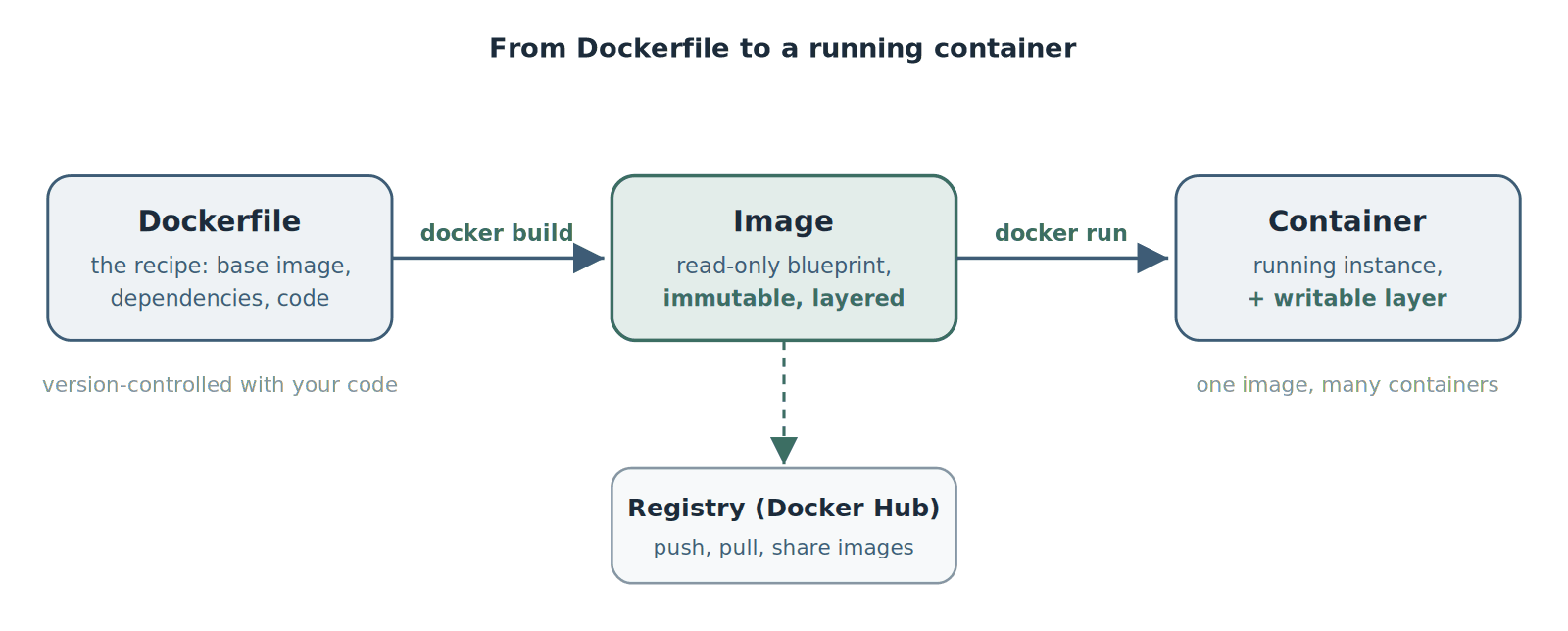
A Dockerfile is built into an image, which is run as a container. Images can be pushed to and pulled from a registry.
Dockerfile.
A plain text recipe. It says which base image to start from, which dependencies to install, which files to copy in, and which command to run when the container starts. It lives in version control next to your code, which means your environment is reviewed and tracked exactly like your application.
Image.
Running docker build turns that recipe into an image. Each instruction in the Dockerfile creates a layer, and the layers stack. This is why rebuilds are fast, unchanged layers are cached and reused, and it is also why image size can creep up: a file added in one layer and deleted in a later one still exists in the earlier layer, invisible but occupying space.
Container.
Running docker run turns the image into a live container. And because images are portable, you can push them to a registry such as Docker Hub, then pull and run the exact same image on a colleague's machine, in your CI pipeline, and in production.
05Containers vs virtual machines
Both give you isolation, but they work at different levels, and the difference is practical rather than academic.
| Containers | Virtual machines | |
|---|---|---|
| What it virtualizes | The application and its dependencies | An entire computer, including the OS |
| Operating system | Shares the host's kernel | Runs a full guest OS of its own |
| Typical size | Megabytes to a few hundred megabytes | Gigabytes |
| Startup time | Seconds | Minutes |
| Isolation | Process-level, lighter | Stronger, hardware-level |
| Best for | Microservices, CI/CD, packing many apps per machine | Legacy apps, strict isolation, other operating systems |
Note: Sizes and startup times are typical ranges, not fixed rules.
The short version: containers are lighter and faster because they skip the guest operating system, while virtual machines give you stronger isolation because they do not share a kernel. Plenty of teams use both, running containers inside VMs in the cloud.
06Docker vs Kubernetes: what is the difference?
This confusion is worth clearing up because the two names appear together constantly.
Docker
Builds and runs individual containers. Docker is how you make the box.
Kubernetes
Orchestrates many containers across many machines, deciding where each one runs, restarting the failed ones, and scaling them with demand. Kubernetes is how you manage a warehouse full of boxes.
You typically use both: build the image with Docker, then let Kubernetes run it at scale.
One nuance worth knowing: Kubernetes no longer uses Docker itself as its runtime under the hood (it uses containerd or CRI-O). That change made headlines, but it does not affect you as a user. Images built with Docker follow an open standard and run on Kubernetes exactly as before.
07Why use Docker? The benefits
Consistency.
The same image runs identically on a laptop, in CI, and in production.
Fast onboarding.
A new engineer runs one command instead of spending a day configuring their machine.
Isolation.
Two services needing different versions of the same library can run side by side without conflict.
Efficiency.
Containers are far lighter than virtual machines, so you fit more on the same hardware.
Portability.
Because the image format is an open standard, you are not locked to one cloud.
It underpins modern CI/CD.
Building a container image is the standard packaging step in most CI/CD pipelines, and it is what makes "build once, deploy anywhere" possible.
08Docker in 2026: licensing and alternatives
Two things have changed that are worth knowing before you standardize on Docker.
Docker Desktop is no longer free for larger companies.
Docker changed its subscription model so that bigger commercial organizations need a paid plan, which turned a purely technical choice into a budget conversation for some teams. The thresholds and per-seat pricing have shifted over time, so check Docker's current pricing rather than relying on a number you read somewhere. Note that this affects Docker Desktop, the GUI application, not the underlying open-source engine on Linux.
Podman is the main alternative.
Built by Red Hat, it is free and open source, runs without a background daemon, and is rootless by default, which is a meaningful security advantage. It is largely compatible with Docker commands, so switching is less painful than it sounds. A common 2026 pattern is Docker for local development, where its tooling is still the smoothest, with Podman or containerd in CI and production.
Docker remains the most widely used option and the default most engineers reach for, so this is not a "Docker is dying" story. It is simply worth knowing you have choices, especially if you are a larger team looking at licensing costs.
09Do you need Docker, and how do you start?
If you are deploying software regularly, almost certainly yes. Docker is close to table stakes now: it is how modern applications get packaged, and it is a prerequisite for Kubernetes, most CI/CD pipelines, and most cloud deployment options.
The good news is that Docker is far easier to adopt than Kubernetes. Start small: write a Dockerfile for one service, get it running locally, then use that same image in your CI pipeline. Add Docker Compose when you need to run a few services together on your machine. You do not need orchestration on day one, and you should not reach for Kubernetes just because you have started using containers.
Want this set up properly?
If you would rather have your applications containerized and your pipelines set up without pulling engineers off product work, that is what our CI/CD pipeline setup and managed DevOps work are for, and our Kubernetes consulting picks up when you outgrow single-machine containers.
Book a free technical callContents
Frequently Asked Questions
Common questions about Docker
Quick answers to the most common Docker questions.
01What is Docker in simple terms?
02What is the difference between a Docker image and a container?
03What is a Dockerfile?
04What is the difference between containers and virtual machines?
05What is the difference between Docker and Kubernetes?
06Is Docker free?
07Is Docker hard to learn?
08Do I need Docker and Kubernetes?
Need help containerizing your app?
Book a free technical call and we will tell you honestly what is worth doing now and what can wait.
No pressure. Just a conversation to see if we're a good fit.