The short version
Use GitHub Actions if your code is on GitHub and you want low-maintenance CI/CD; you commit a YAML file and GitHub runs it, with nothing to host. Use Jenkins if you need self-hosted control: air-gapped or on-premises builds, very high build volumes, complex or legacy pipelines, or heavy shared libraries. GitHub Actions is the sensible default for most teams; Jenkins is far from dead, and still the right call for real cases.
01The short answer: the decision in one rule
Here is the rule that settles most of these debates. If your code lives on GitHub and you do not have a strong reason to run your own CI infrastructure, GitHub Actions is the sensible default: it is already there, there is nothing to host, and you get going by committing a workflow file. If you need to run builds in an air-gapped or on-premises environment, you have very high build volumes, or your pipelines are complex enough that a managed service gets in the way, Jenkins gives you the control to handle that.
Most small and mid-sized teams building on GitHub are better served by GitHub Actions, simply because the maintenance burden of Jenkins is real and rarely worth it at that size. But "GitHub Actions by default" is not "Jenkins never." The rest of this guide is about knowing which case you are in.
02What Jenkins is
Jenkins is an open-source automation server that has been the workhorse of CI/CD since 2011. You host it yourself, define your pipelines in Groovy (in a file called a Jenkinsfile), and extend it with a very large plugin ecosystem that integrates with almost every tool in the DevOps landscape. Its architecture is a controller coordinating one or more agents, which lets it distribute builds across many machines.
Jenkins's great strength is flexibility. It runs anywhere, from a small server to a large cluster, including fully on-premises and air-gapped networks, and its plugins and Groovy pipelines can express almost any workflow you can imagine. The trade-off is that you own all of it: you provision the server, install and update it, manage the plugins, and handle security and backups yourself. That control is exactly what some teams need, and exactly what others would rather not carry. Jenkins is documented at jenkins.io.
03What GitHub Actions is
GitHub Actions is a CI/CD service built directly into GitHub. It launched in 2019 and has become the default choice for teams whose code already lives on GitHub. You define workflows in YAML files inside your repository, and they trigger on GitHub events like a push or a pull request. GitHub provides cloud-hosted runners, so there is no server to manage; it handles scaling, updates, and maintenance for you.
The appeal is how little there is to run. Your CI lives next to your code, the feedback loop is tight, and a Marketplace of reusable actions means you rarely start a workflow from scratch. GitHub Actions also supports self-hosted runners if you want builds to run on your own hardware, which we will come back to. For teams that want a hands-off CI/CD experience, this is a big part of why Actions has grown so fast. It is documented at docs.github.com/actions.
04Jenkins vs GitHub Actions, side by side
Here is the direct comparison across the dimensions that usually decide it.
| Dimension | Jenkins | GitHub Actions |
|---|---|---|
| Hosting | Self-hosted, you run it | Managed by GitHub (self-hosted runners optional) |
| Config language | Groovy (Jenkinsfile) | YAML workflows |
| Setup | Provision, install, configure, maintain | Commit a file, it runs |
| Ecosystem | Very large plugin library | Marketplace of reusable actions |
| Maintenance | You own it (updates, security, backups) | Almost none |
| Cost | Free tool, you pay for infrastructure | Free tier, then usage-based (verify current rates) |
| Best for | Self-hosted control, complex or legacy pipelines | Teams on GitHub wanting low-ops CI/CD |
05The real differences that matter
Beyond the table, a few differences show up in daily work.
Hosting and maintenance.
This is the core split. Jenkins is powerful because you run it, and it is a burden for exactly the same reason: someone has to keep it patched, available, and backed up. GitHub Actions removes that entire category of work by running on GitHub's infrastructure. For most teams, the maintenance saved is the single biggest factor.
Configuration language.
GitHub Actions uses YAML, which is quick to learn and perfectly sufficient for standard build, test, and deploy flows. Jenkins uses Groovy, which is more powerful for complex logic, custom shared libraries, and intricate conditional pipelines, at the cost of a steeper learning curve. If your pipelines are straightforward, YAML is a feature; if they are genuinely complex, Groovy's expressiveness is worth something.
Cost model.
Jenkins itself is free; you pay for the servers it runs on and the engineering time to maintain it. GitHub Actions is free for public repositories and includes a free-minutes allowance for private ones, with usage-based pricing beyond that. Because maintenance tends to dominate the true cost of CI/CD, managed Actions usually wins economically for small and mid-sized teams, while self-hosting can become cheaper at very high build volumes. Pricing changes, so check GitHub's current pricing page rather than relying on a number in a blog post.
Security and control.
Jenkins gives you complete control over your build environment, network isolation, and access controls, which matters for strict compliance. GitHub Actions handles a lot of security for you, and offers secrets management and hardening options, but it is a cloud service by default.
06When each one wins
The honest way to choose is by scenario rather than by feature count.
GitHub Actions is the better default when:
Your code is on GitHub, your pipelines are standard build-test-deploy flows, you do not have a dedicated DevOps team, and you would rather not run CI infrastructure. This describes a large share of startups and product teams.
Jenkins is the better choice when:
You need air-gapped or fully on-premises builds, you have very high build volumes where per-minute billing hurts, you maintain complex pipelines or large shared libraries that would be painful to rebuild in YAML, or you need to orchestrate across many source-control systems. Teams with a platform or DevOps function that wants deep control often land here.
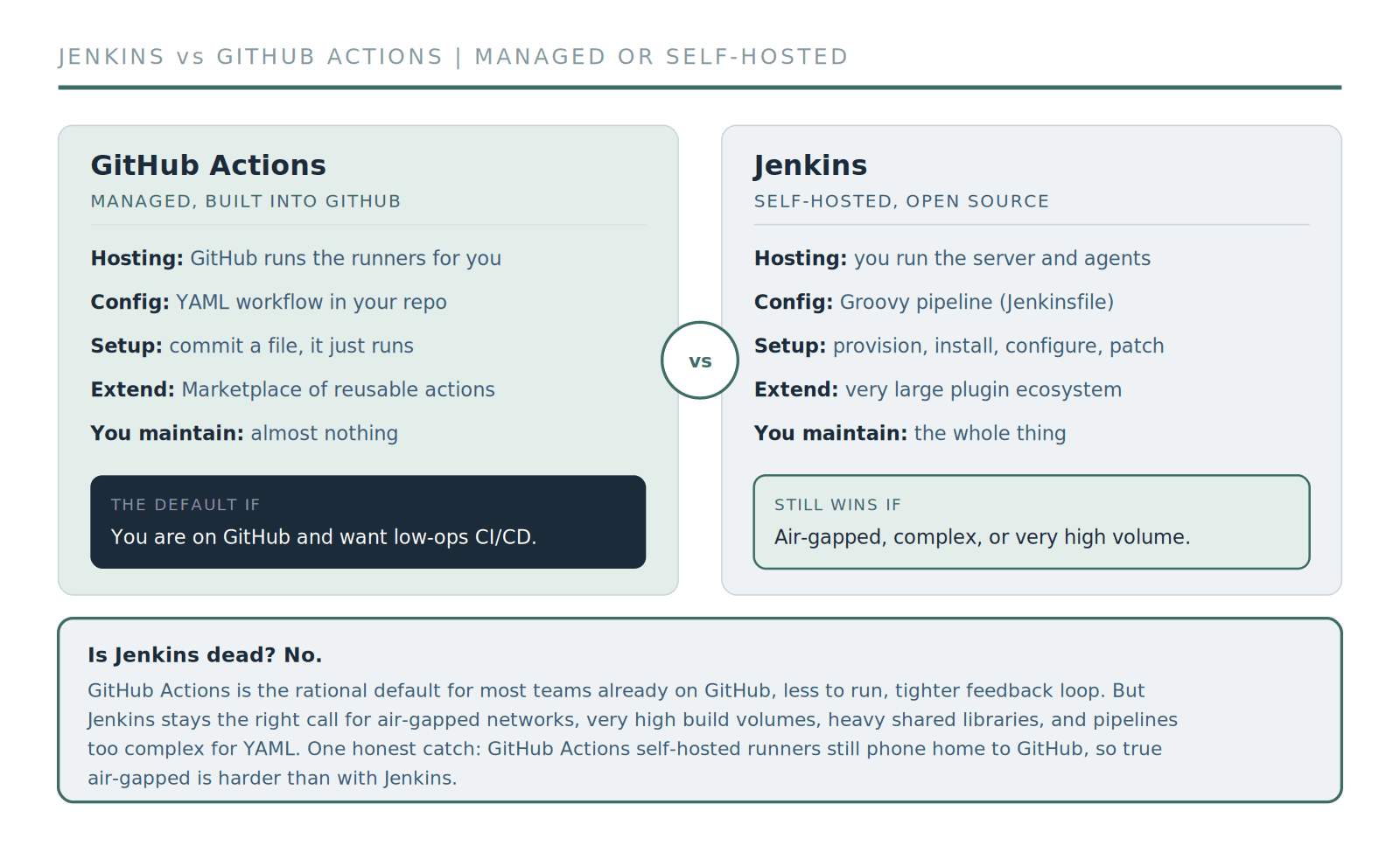
GitHub Actions is the low-ops default; Jenkins still wins where you need self-hosted control. One honest catch: even GitHub Actions self-hosted runners must reach GitHub's control plane, so a truly air-gapped setup is harder than with Jenkins.
That last point is worth emphasizing because many comparisons miss it. GitHub Actions does support self-hosted runners, so you can run builds on your own hardware. But those runners still need to reach GitHub's control plane over the internet, which means a fully air-gapped deployment is genuinely harder with Actions than with Jenkins. If true isolation is a hard requirement, that alone can decide it.
07Is Jenkins still relevant in 2026?
You will see a lot of "Jenkins is dead" takes. They are wrong. Jenkins is not the default for greenfield projects the way it once was, and for a team starting fresh on GitHub, Actions is usually the better call. But Jenkins remains widely deployed and actively maintained, and it is still the right tool for a large set of real situations: enterprises that need full control, teams with complex or heavily customized pipelines, organizations with strict on-premises or air-gapped requirements, and anyone with years of investment in Jenkins shared libraries that would be expensive to migrate.
So the honest framing is not "old versus new." It is "managed and low-ops versus self-hosted and fully controllable." Jenkins losing its default status is not the same as Jenkins losing its value. If someone tells you to rip out a working Jenkins setup purely because it is old, be skeptical.
08Migrating from Jenkins to GitHub Actions
Moving from Jenkins to GitHub Actions is one of the most common CI/CD projects we see, usually when a team consolidates onto GitHub and wants to shed maintenance. It is very doable, but it is not a flip-switch, and treating it like one is how migrations go wrong.
The effort scales with how many pipelines you have and how deeply you rely on plugins and shared libraries. A handful of simple pipelines can move quickly; hundreds of pipelines built over years, with custom plugins and shared libraries, is a real project. The right approach is incremental: move pipelines one at a time, run both systems in parallel during the transition, and rebuild anything that leaned on a Jenkins-specific plugin as a native Actions workflow rather than a literal translation. Budget real engineering time, and do not cut over everything at once. If you would rather not run that migration yourself, our managed DevOps services and DevOps automation teams do exactly this kind of work, and our CI/CD pipeline setup team can design the target pipelines.
Planning a Jenkins to GitHub Actions move?
We migrate pipelines incrementally so nothing breaks in the cutover, and design the target workflows to fit your stack.
CI/CD pipeline setup services09You are not limited to these two
Jenkins and GitHub Actions are the common framing, but they are not the only options. If your code is on GitLab, GitLab CI is the natural, tightly integrated choice. CircleCI and Travis CI are other managed CI/CD services worth a look. And Argo CD or similar tools handle the deployment side for Kubernetes-heavy setups. You do not need to evaluate all of them, but it is worth remembering the decision is not strictly binary. If you want help mapping the landscape to your stack, our CI/CD pipeline setup services team does this regularly, and our explainer on what CI/CD is covers the fundamentals.
Contents
Frequently Asked Questions
Common questions about Jenkins and GitHub Actions
Quick answers to the most common questions.
01Is GitHub Actions better than Jenkins?
02Should I use Jenkins or GitHub Actions?
03Is Jenkins still relevant in 2026?
04Can GitHub Actions run on my own servers?
05How hard is it to migrate from Jenkins to GitHub Actions?
Picking a CI/CD tool, or migrating off one?
We help teams choose between Jenkins, GitHub Actions, and the alternatives, and build pipelines that hold as you scale.
No pressure. Just a conversation to see if we're a good fit.